


If you have spent any time scrolling through short-form video feeds lately, you have seen the problem. The timeline is flooded with AI-generated videos that all look exactly the same. They feature warped faces, random lighting changes, and objects that melt into the background after three seconds. These are the result of “one-click” generation tools that sell convenience but deliver amateur results.
For digital publishers and content strategists building serious media assets, relying on one-click prompt generators is a fast track to destroying your brand trust. To dominate attention and keep viewers engaged, you have to treat AI video generation not as a toy, but as a controlled, step-by-step filmmaking studio.
This guide breaks down the exact AI video generation workflow to produce high-end, brand-consistent, short-form AI video at scale. We are bypassing the generic software pitches to focus on the actual mechanics: micro-batching clips to prevent model hallucinations, locking in your exact brand aesthetics, and scripting hooks that force viewers to stop scrolling.
The Core Problem: Temporal Drift and the 4-Second Limit
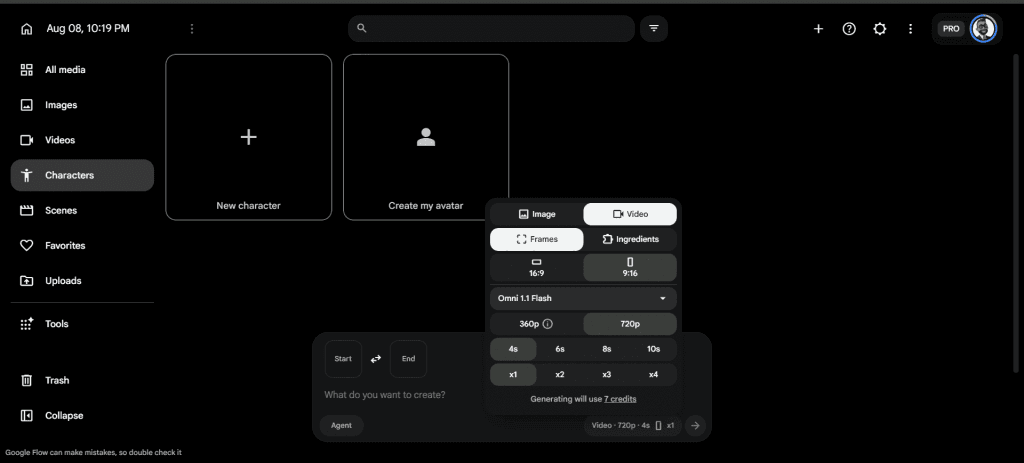
The biggest giveaway of amateur AI video is “temporal drift.” This happens when an AI model starts hallucinating as a clip plays out. A face subtly changes shape, a hand gains extra fingers, or a background object shifts position between frames. This instability occurs because the longer a video runs, the harder it is for the model’s memory to maintain spatial consistency and cross-frame alignment.
Industry testing reveals a hard truth: 4 to 6-second clips balance narrative clarity with temporal stability perfectly. Pushing an AI generation past 8 seconds drastically increases the risk of drift in identity, lighting, and composition.
If you type a single prompt asking for a 30-second scene, the system will eventually fail. The professional solution is the Micro-Batching Assembly Line.
What is Micro-Batching?
Instead of generating a monolithic video, you architect a sequence of short, deliberate beats. By leveraging Google Flow running the Omni Flash model, you can generate precise 4-second B-roll clips. These clips are then stitched together in a standard video editor.
This approach gives you granular control over every cut, entirely bypassing the temporal drift problem. It also allows you to sequence aggressive visual changes on the beat of your audio track, which is critical for viewer retention.
AI Video Generation Workflow Phase 1:
The “Seeded Reference” Brand Consistency Framework
AI models default to whatever visual style is mathematically average in their training data. If you do not explicitly lock down your visual identity, your videos will look like random internet stock footage. To build a recognizable media property, your visual aesthetic must be ruthlessly consistent.
This requires integrating your graphic design software directly into your AI workflow before you ever write a video prompt. By using Canva to establish structural assets, you can feed explicit parameters into your video generator.
1. Build Your Visual Tokens
A true brand presence relies on specific color hex codes, not generic color names. For example, if you are building assets for a brand like Passive Secrets or HussleDad, do not just tell the AI to make a “green and orange” background.
Instead, construct base images in Canva using your exact brand palette — for example:
Export these base graphics, logos, and custom character avatars as static images.
2. Utilize Reference Images in Google Flow
Omni Flash lets you upload multiple reference images to guide the generation and ensure continuity. When you upload your Canva-designed avatars or hex-coded backgrounds as reference images, you force the AI to adhere to your established brand rules.
If you are seeing identity drift between clips, keep the subject’s clothing, pose, and color palette identical across your uploaded references. This seeded reference acts as a strict guardrail, ensuring every 4-second clip generated in Google Flow belongs to the exact same visual universe.
AI Video Generation Workflow Phase 2:
Mastering the Prompt Syntax for 4-Second Clips
When working within the 4-second micro-batch constraint, your prompts must be highly technical. Poetic metaphors confuse the model. You need a formula that isolates the subject, defines the environment, and limits the motion.
A professional video prompt in Google Flow should follow this exact sequence:
[Subject] + [Setting] + [Camera Movement] + [Lighting/Mood] + [Negative Constraints]
Defining Camera Movement
Numeric pan or zoom speeds do not work well in current AI models. Instead, use motion verbs combined with direction and duration. Because we are working in 4-second constraints, the movement must be singular and deliberate.
Good: “Over 4 seconds, slow push-in from medium shot to close-up.”
Good: “Locked-off tripod shot with subtle handheld sway.”
Bad: “Zoom in really fast while the camera pans around the room.” (This violates the one-major-action rule and will cause the video to warp).
Structuring Negative Prompts
Negative prompts tell the AI what to exclude. A short, reusable negative list improves polish significantly. If your video features a character, you want to explicitly ban erratic movements.
Use: “No camera shake, no jump cuts, no extreme facial expressions, no flickering shadows.”
Example Omni Flash Prompt
“4-second clip, 9:16 aspect ratio. Medium close-up of a professional male avatar, center-framed. Wearing a navy bomber jacket. The background is a modern office softly lit with accent lighting in your brand’s highlight color. Soft warm studio key light from the left. Locked-off tripod shot. The avatar looks directly into the lens and gestures once with his right hand. No jump cuts, no camera shake, no flickering shadows.”
AI Video Generation Workflow Phase 3:
The “Stat-Drop” Hook Matrix (8-Second Scripts)
The highest-quality AI video in the world will still fail if the script does not convert. On platforms like YouTube Shorts, Instagram Reels, and TikTok, the viewer makes a subconscious decision to stay or swipe within the first three seconds.
Generic hooks like, “Here are three ways to improve your business,” no longer work. You need to use the “Stat-Drop” framework. This involves pairing a jarring, hyper-specific industry statistic in the voiceover with an aggressive visual motion cut on Frame 1.
The Psychology of the Stat-Drop
Human brains are wired to notice anomalies. When you open a video with a massive, unexpected number, it creates an immediate knowledge gap. The viewer has to stick around to find out how that number impacts them.
The 8-Second Script Template
Here is exactly how to script the first 8 seconds of your videos to maximize retention:
Second 0.0 to 1.5: The Pattern Interrupt (Clip 1)
Visual: A fast, 1.5-second high-contrast establishing shot (e.g., a data infographic featuring your brand’s highlight color).
Voiceover: “92% of digital publishers are losing…” (Start the audio exactly on the first frame).
Second 1.5 to 4.0: The Context Anchor (Clip 2)
Visual: Hard cut to your brand avatar (generated via the seeded reference framework). The camera executes a slow dolly push-in.
Voiceover: “…thousands of dollars this year because their sales funnel has a fatal leak.”
Second 4.0 to 8.0: The Solution Pivot (Clip 3)
Visual: Screen recording or a 4-second B-roll clip showing a specific mechanism (e.g., a CRM dashboard).
Voiceover: “But fixing it doesn’t take a developer. It takes a simple three-step automation that takes 10 minutes to build.”
This 8-second matrix is a masterclass in pacing. You are delivering three distinct visual changes within a tiny window, keeping the viewer’s eyes constantly scanning new information, while the voiceover transitions them from a massive problem to an actionable solution.
Step-by-Step SOP: Building the Workflow from Scratch
Now that we have the mechanics, here is the exact Standard Operating Procedure (SOP) to execute this workflow for your brand.
Step 1: Pre-Production in Canva
Step 2: Scripting the Matrix
Step 3: Generation in Google Flow
Step 4: Assembly and Audio Sync
Step 5: SEO and Publishing Optimization
Even for short-form video, SEO matters. When embedding these videos into your website content (which heavily boosts dwell time and improves your site’s SEO metrics), ensure the file name of the video includes your focus keyword.
Add accurate, closed-caption SRT files to the upload on YouTube Shorts or TikTok. Search engines scrape these caption files to understand the semantic context of your video. If your audio mentions “fixing a broken sales funnel,” the algorithm will index that video for those exact search terms.
The Future of Brand-Owned Media

The creators who win in 2026 will not be the ones who generate the most videos. They will be the ones who generate the highest-quality, most consistent videos. By abandoning the lazy “one-click” generators and adopting this structured, micro-batching studio workflow, you build an insurmountable moat around your brand.
When you control the temporal stability, lock in the exact color hex aesthetics, and master the psychology of the 8-second hook, your AI videos stop looking like cheap automation and start looking like premium media assets. Execute the workflow, stick to the 4-second rule, and scale your content engine.
Also Read:
- The Most Affordable Way Ever to Buy a Domain and Set Up WordPress — The Complete Beginner’s Guide
- How to Build an SEO-Proof AI Content Workflow (The “Cyborg” Method) – 2026
- How to Make Money Online With AI in 2026 — The Complete Beginner’s Guide
- How You Can Use AI to Earn Your First $ 1,000 Online in 7 Ways
- Can AI Help You Build Passive Income in 2026?
- AI Online Income vs Traditional Online Income — What’s Actually Different in 2026?
- 5 Mistakes Beginners Make Trying to Earn Online
- Best Free AI Tools to Make Money Online in 2026
- Best Free AI Tools for Writing Content in 2026
- Best Free AI Tools for Social Media Marketing in 2026
- Best Free AI Tools for Affiliate Marketers in 2026




1 thought on “The Ultimate AI Video Generation Workflow: Stop Making Robotic Clips in 2026”
The content is really great